-
CP Rewritten: Mascots & Codes for 10 Million Penguins Celebration
Some preparations are being made for when Club Penguin Rewritten reaches the milestone of ten million registered penguins, which is rapidly approaching. The team have confirmed that there are going to be a series of mascot visits, although it’s not been announced which could visit yet.
We are close to a fun little milestone of ours, 10 million penguins. We will be releasing 10 items every day up to 10 days, similar to the fruit codes we had! During this time, we’ll be doing some fun little mascot visits and group events with you all.
-stu, Club Penguin Rewritten administratorAlongside the mascot visits, there will be some items released as codes! The quote above suggests that up to a hundred items will be released, with a code for ten items everyday, similar to the way fruit codes operated. This will last for a duration of ten days, so it’s going to be a huge amount of items to mark this significant milestone!
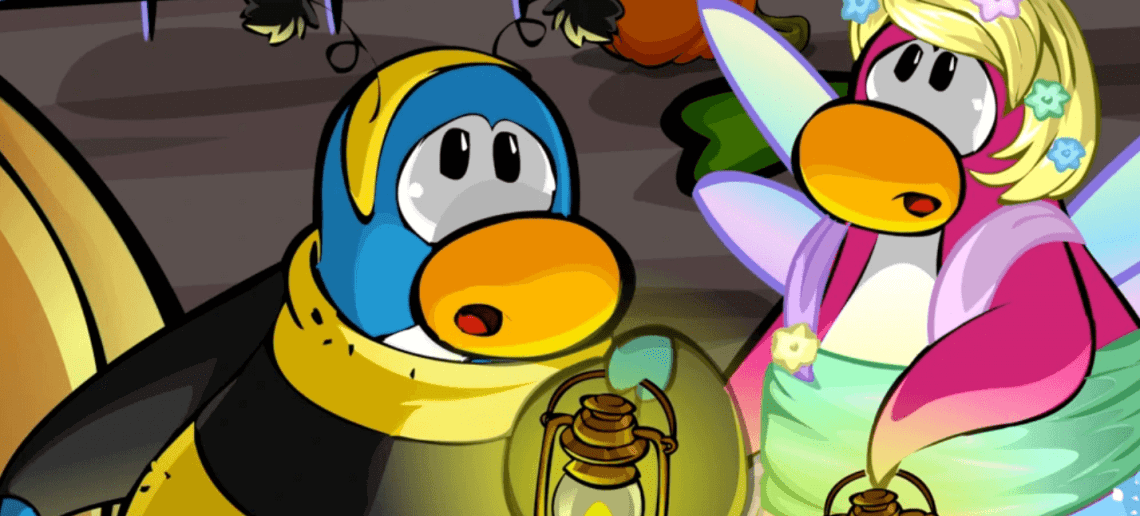
A small sneak peek has also been shared showing some of the items. It’s probably possible to guess a couple of them from the image below, such as the Herbert Costume, and they’ll contain items as “throwbacks” to some parties in 2017 and 2018.

For previous milestone celebrations, it was never confirmed in advance which mascots were visiting, so it could be a bit of a surprise! As always, the Mascot Trackers will contain the latest news and updates about their locations once they begin visiting.
Thank you very much for reading, be sure to check back for more of the latest Club Penguin Rewritten news and guides!
Waddle on!
-Torres 126 -
Andrew Doll on the Processes Behind Club Penguin’s Artwork
I’m extremely pleased to share today’s interview with Andrew Doll, who worked at Club Penguin since 2012! He was an artist for the game behind a range of recognisable rooms, and he’s kindly taken the time to share the processes and experiences behind making those rooms a reality while also sharing some concept artwork.

Contents:
Selecting the Ideas
Before any artwork could begin to be created, the Club Penguin team first had to decide which ideas should be implemented. This wasn’t always easy, especially given the quantity of ideas which could sometimes be submitted by the community. As such, there was an established process for ensuring this happened successfully.
When I worked at Club Penguin I was on a team called the “Core” team. This team was responsible for creating all of the content for the monthly parties and any regular Evergreen content updates to the game. Every month the production team would get together for a brainstorm session where we would be given a theme and then come up with a few fun party ideas. At this point the Core team would take one of those ideas and break down a high level story and make a list of rooms, furniture, and clothing items for the party. Once the Core team was given the green light from an executive review panel, it was then up to the various art disciplines to create the content. We would meet up a couple times a week to review progress and offer constructive feedback as a team to make sure that we were creating the most polished experience possible.
Turning the Ideas to Life
Andrew lays out four main stages to creating rooms:
- Brainstorm and concept
- Ink and lines
- Paint and colours
- Functionality
Brainstorm and concept:
Gather references for inspiration/mood board
Create thumbnail sketches to get the ideas flowing
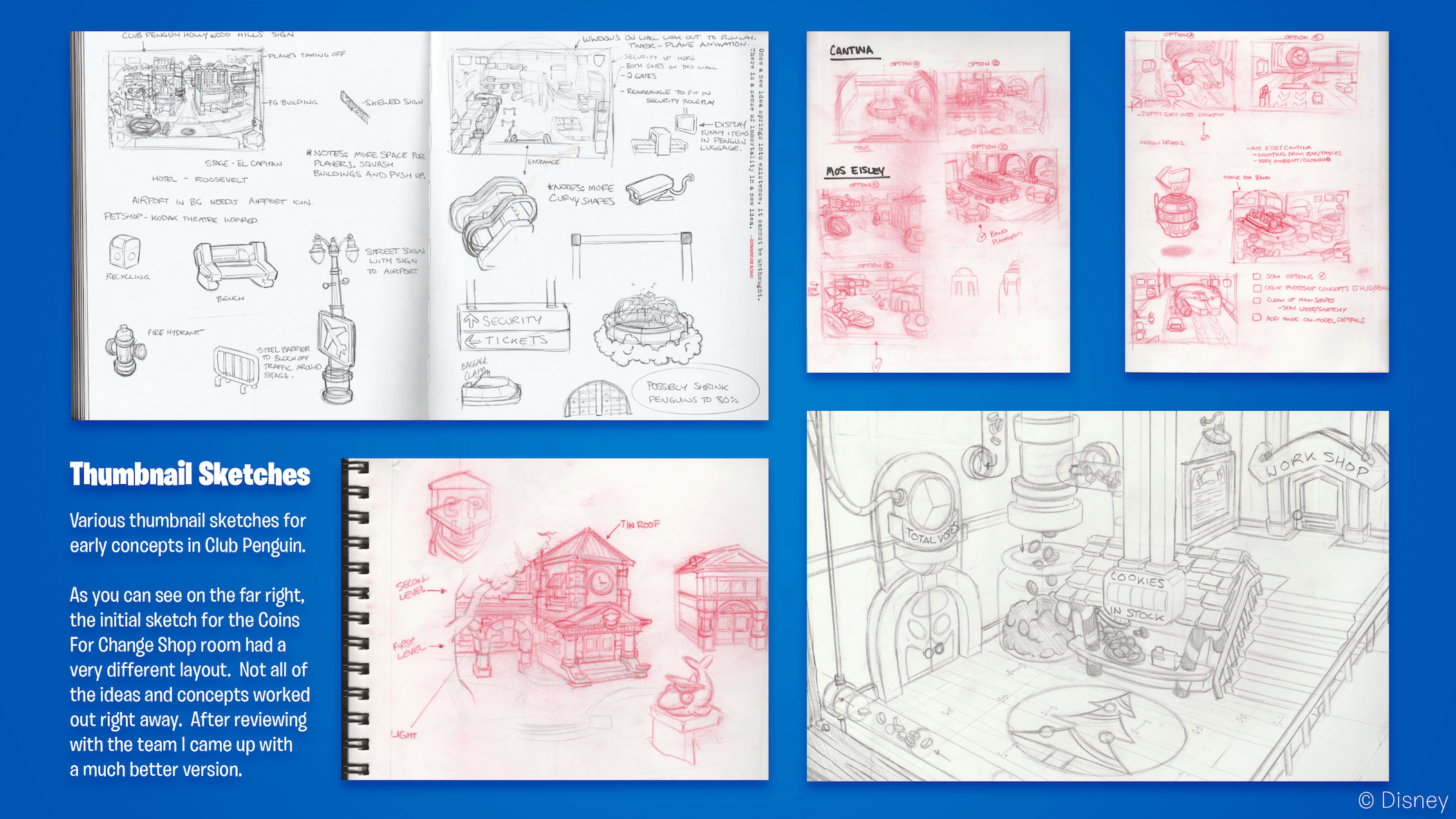
Create a concept based on thumbnails and show it to the team for review.Featured below are various of those thumbnail sketches. The sketches in the top left appear to show the Airport which was included at the Muppets World Tour in 2014, and the top right show rooms from the Star Wars Takeover during the same year.
In the bottom left, you can see some of the sketches for the exterior of the School building, which replaced the Recycling Plant in 2013. The bottom right shows a concept for the Cookie Shop that was part of the Holiday Party in 2012, but as stated in the image, the final design was considerably different.
Note: with all images in this post, if you click them, you’ll be able to zoom in Ink and lines:
Just as some context for those who are unaware, Adobe Flash Professional was the tool used for this.
Draw over top of the concept using preset line widths in Adobe Flash Professional.
Paint and colours:
Sample colors from your concept and use the bucket fill tool to fill in your inked room. We would use a slicer line to cut into and separate fill zones to add stepped/cel shading. A slicer line is when you set your line width to the smallest it will go and change the color to a bright, easily identifiable color to remove after it is no longer needed.
In order to give an example from one of the rooms in the sketches above, this was the final result of the Plaza and Airport at the Muppets World Tour (top left sketches).
Functionality:
The final part of the process was adding the interactivity! Continuing the example above of the Airport at the Muppets World Takeover, these included features such as how the carousel on the left of the room would be animated to move baggage, along with a button to change the destination shown on the right.
All of the rooms we created in Club Penguin required ActionScript code to add interactivity. We had a great team of programmers that built a lot of awesome features for those parties as well as adding some functionality to the rooms. Not all, but some of us artists on the Room Art team knew how to program in ActionScript so we would create the code for our own rooms and make sure to get one of the programmers to review it. Creating the art for the rooms was such an awesome experience that I liked to do, but programming and figuring out new ways to add some cool room functionality was one of the things I enjoyed the most.
Separately, Andrew notes that artists would generally work on each piece from concept to ink and paint, although there would occasionally be some collaboration where different people would complete different parts of the process – this wasn’t the norm though.
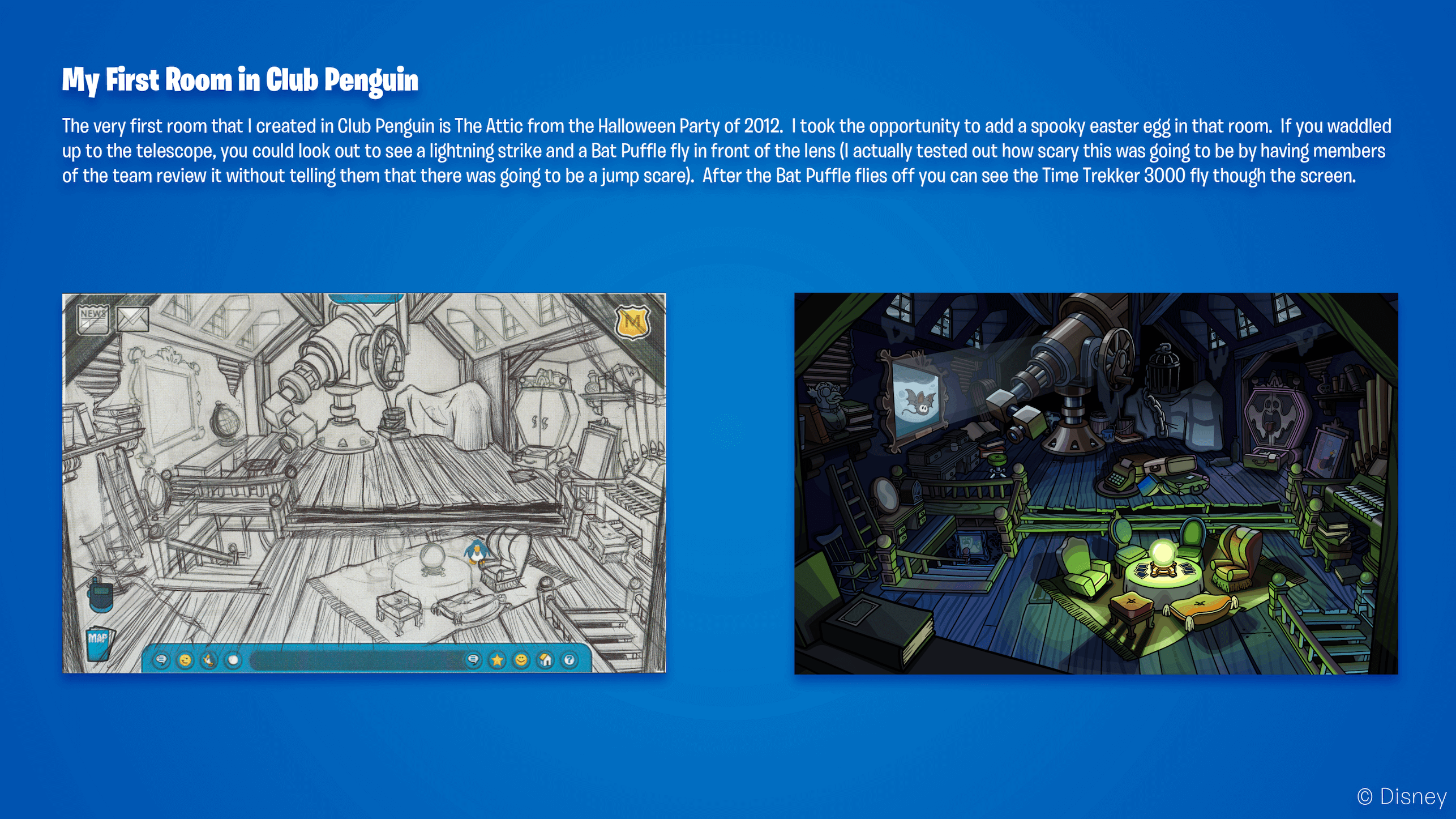
You can see the whole process demonstrated below in other rooms below too! This one was from the Halloween Party in 2012, and the image includes an anecdote about how it was put together.
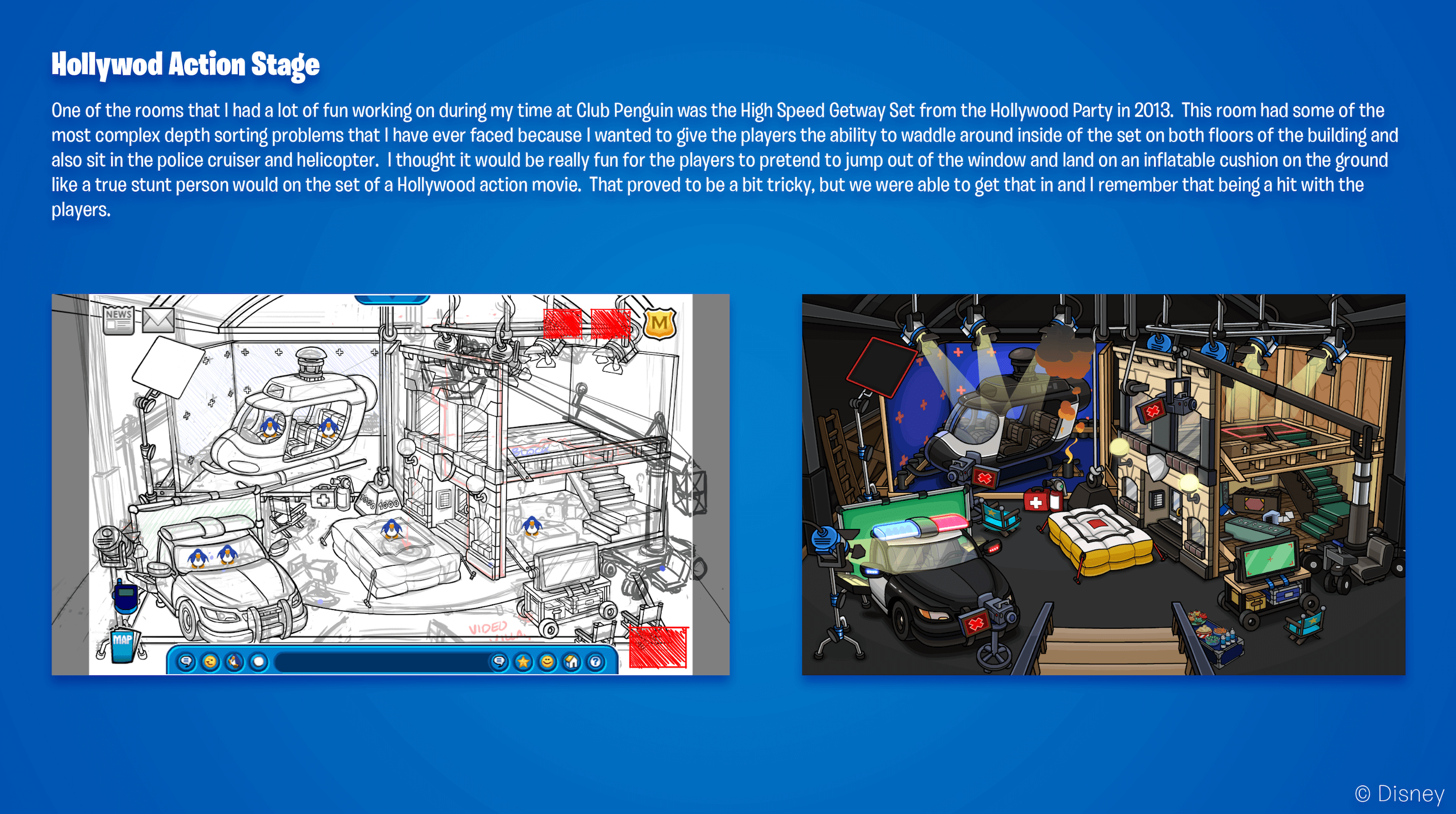
One of the rooms also shared by Andrew was the High Speed Getaway Set at the Hollywood Party in 2013. As detailed in the image, this was filled with features and complicated to create due to the high ambitions held. Interestingly though, although this particularly room was received extremely well, there was often nervousness when releasing these sorts of new events!
There was definitely nervousness around how a party or new feature was going to go over with the players. At the same time though, there was also a lot of excitement around how the players would respond. On release day we would always log in with our Penguins and waddle around to see the reactions. It felt rewarding and inspiring when we saw the players waddling around, interacting and role-playing in the party.
I still remember the Hollywood Party in 2013, and it was definitely extremely popular for roleplaying!
The Challenges
Alongside the room process, Andrew also detailed some of the challenges which he experienced in his time at Club Penguin! I should note that some of these are quite technical, but in the example below, it’s effectively being highlighted how the team managed to avoid situations where penguins would look odd around their surroundings because of the different layers.
In the early days when I was working on room art there were a few challenges that I regularly encountered. One of those challenges was figuring out how to build the room in parts that would allow the Penguins to depth sort between the various layers. This was achieved by strategically placing each objects pivot point in a location where if the Penguin was below the pivot point on screen it would appear above that object, but when the Penguin waddled above that pivot point, the Penguin would appear behind that object. It was always a goal to provide the player with a sense of dimension and depth to the rooms so when a room design became a bit more complex with multiple levels, placing these pivots and strategically breaking up the art was challenging.
The example below is also quite technical, but details how the team would deal with ensuring rooms had exciting animations and interactivity without being too heavy, thereby causing problems on slower computers. Also, just to note for context, “caching” effectively refers to storing the data for future usage.
Another challenge that I faced in the early days when I was working on Club Penguin was finding ways to add more animation and interactivity to the rooms while also keeping performance and file size in mind. Every time there was something moving on screen, the Flash Player would redraw that area of the screen. Because Club Penguin was created using vector artwork, the file size was relatively small, but there were thousands, in some cases millions of vector points in the artwork. Redrawing this artwork when something was animated was very costly to performance so we had to come up with some tricks to optimize this for the players out there that didn’t have the newest and fastest PC’s at that time. One optimization method I came up with was using a feature that Flash has called “Cache As Bitmap”. This takes the vector artwork and converts it to a lightweight easy to render raster or pixel version of the art. I built a custom script that took an animation and converted every frame in the sequence to a symbol that would “Cache As Bitmap”. I had every animation frame appear offscreen and create the bitmap cache on the first frame that the player entered the room. I would have each bitmap frame appear on screen in its correct location on the frame when it was needed and then I would move it off for the next bitmap frame. This would just loop as long as the player was in the room. After we found this method to prove quite efficient with boosting performance a few of us Room Artists and some of the Core Programmers worked together on implementing this idea on the Penguins as well. When a player would move around the screen or dance or throw snowballs, they would be redrawn as vector artwork, but once they stopped to type a message, or sit and read the newspaper, they would be cached as a bitmap and would not redraw until they moved again. This really boosted performance when we really needed it.
This ended up being really significant to the team, and resulted in Disney Inventor Awards following a filing for a patent in the USA.
The work we did to optimize the Room Art and the Penguins was a really big win for the team. It gave the game a boost in performance that was really needed at that time. This work was submitted through the Disney Inventor Awards program which recognizes innovation within the company. Our team was rewarded with Disney Inventor Awards and plaques after we filed for a U.S. Patent.
Alongside these developments, Andrew also shared examples of some tools which he created to improve the workflow of the Club Penguin team to create rooms.

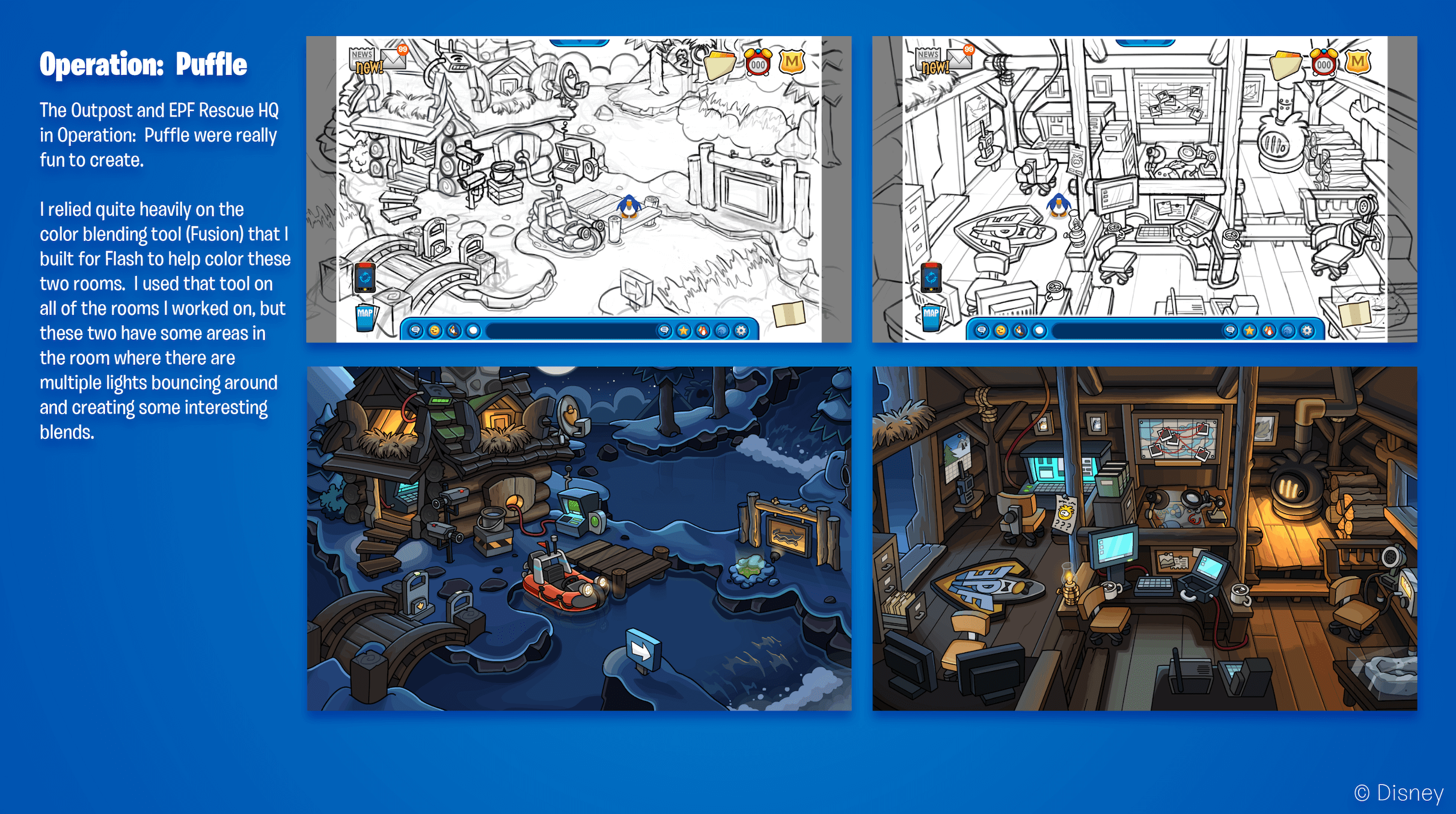
One of those tools referenced above is Fusion, which helped with creating colours. An example of where this was used was during Operation Puffle in 2013, which was an event held during the nighttime. Those sort of events required some remarkable lighting, and as stated below, Fusion helped to create these blends.
These rooms below were The Outpost and EPF Rescue HQ at Operation Puffle in 2013.
Club Penguin Island
When Club Penguin closed as part of the transition to Club Penguin Island, the island had to be completely redesigned into a new technology. For example, you can see some of the Mt. Blizzard landscape below, and just how significantly the 3D artstyle varies from the rooms above.
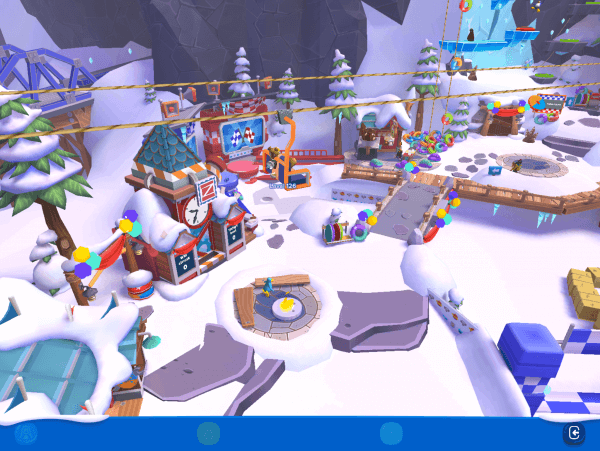
That being said, Andrew still helped bring Club Penguin Island to life, though the transition brought challenges and excitement especially because so much of it was new! His recollection of this is detailed here:
Transitioning from 2D artwork to 3D artwork was both difficult and exciting all at the same time. Translating the goofy and quirky designs from 2D to 3D as well as introducing a new and refreshing visual look to the game was tough, but thankfully we had a lot of very talented people at the studio to help make that transition possible. We ultimately landed on an art style that worked well for readability and was very appealing. There was definitely a lot more that we wished we could have done, but at the time we were quite limited by the minimum spec device that we were supporting which was the second generation iPad. It is quite underpowered and did not have a lot of RAM [memory] available so we had to be quite strategic with how we designed certain parts of that world. Though it was very difficult to limit the amount of creativity and functionality in Club Penguin Island due to low-end device support, we were still happy with how the game transitioned from a 2D to a 3D art style. There were some really fun new things that we were able to do by having a 3D space to waddle around in and the players out there really seemed to enjoy it as well.
Conclusion
I’d like to give a huge thank you to Andrew for taking the time to answer my questions, and for sharing some of the fantastic artwork and concepts included in this post. I’ve always been curious about the creative processes behind Club Penguin, and I hope you’ve also been interested by reading about this process! If you’d like to find more about Andrew, you can view his portfolio here.
Thank you very much for reading!
Waddle on!
-Torres 126
-
Summer Giveaway 2021
As you may be aware, for the last few years, there’s always been a giveaway on this site during the Holiday period in December! However, I thought it’d be fun to hold one this summer too. You can see the prizes for this giveaway below:
- EPF Full Spy Pack
- Card-Jitsu cards tin
- One Mix ‘N Match figure

The winner of the Summer Giveaway is lemmie6 – congratulations, and please check your email! If you didn’t win, don’t worry; there’ll always be more opportunities in the future. [screenshot]
As for the challenge, your answer had to include one of these words:
- Employees
- Closed
- Park
There’s three different answers because the Pet Shop contained one of all those words at some point since 2006, so any was acceptable. Here’s how you were supposed to figure it out though.
Challenge 1 – trivia:
- Purple
- Eerie Castle
- Tate the Migrator
Challenge 2 – decoding: SHOP
Challenge 3 – riddle: with this information, you had to visit the Pet Shop and look for a single word located on a door. The three words above were the only answers, and they were either on the entrance door (in the case of “Closed”) or the door that leads to Puffle Roundup or the Puffle Park.

A considerable number of people entered “Pet Shop” as their final answer, but the form did make clear that the answer to the riddle was a single word, and there is no yellow door which contains those words, so I’m afraid that wasn’t accepted. 36.8% people of answered this correctly.
The giveaway ended on Sunday 8th August at 09:30 BST.
Waddle on!
-Torres 126
-
CP Rewritten: Halloween & Holiday Parties to Avoid Custom Content
A couple of details have been released about the Halloween and Holiday Parties on Club Penguin Rewritten! Last night, the team revealed that there wouldn’t be any “custom” decorations for that event – in other words, it’ll only contain rooms which have been seen before.
As the classical parties arrive very [soon], many are probably wondering the decorations we will decide to use. We will be heading back to the classic times and using the classical, loved decorations of both the Halloween Party and Holiday Party.
It’ll have the classic music with the loved decorations people enjoy. Nothing custom, for both.
-stu, Club Penguin Rewritten administratorThere are probably two notable advantages to this approach, namely that it’ll be nostalgic for a lot of people who were hoping that something similar to this would occur. It should hopefully also mean that delays to these events are less likely since the development plans aren’t as ambitious, with no custom content planned. However, for those who enjoy those surprising pieces of custom content, this might be slightly disappointing.
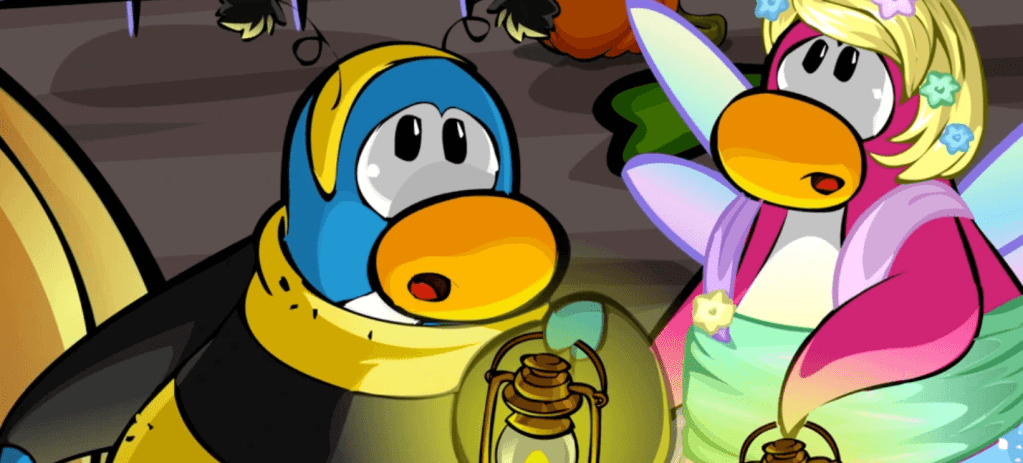
It’s still unclear which designs the team plan to rely on, and there could still be a mix of them from across the different years. I suspect that information will only be known closer to the time though, since we are still a while away from either of those two events!
Thank you very much for reading, be sure to check back for more of the latest Club Penguin Rewritten news and guides!
Waddle on!
-Torres 126 -
Club Penguin’s Sugar Shake
As it is the first week of the month, it’s time for another Mountains Monday post, so I’ve selected a new tune from Club Penguin to share! This one is titled “Sugar Shake”, and it was played at a variety of events; some of these included the SoundStudio Party and Music Jam, but it sometimes was played across the ordinary island when there was no party.
This track is one of the longer soundtracks on Club Penguin and contains multiple melodies, which is probably part of the reason why it was frequently reused! As a result, it might be one which you recognise upon hearing. I hope you enjoy the tune!
Waddle on!
-Torres 126
-
CP Rewritten: Music Jam Delay Update
Happy August! Given that one of the most anticipated moments in July was the release of the Music Jam, I suspect that there might be a little confusion about why it hasn’t begun yet. As such, I wanted to quickly share this update provided by the team.
You’ll learn more [about the Music Jam] soon. Personally, I have no clue what’s going on with it, but I know Gravix is moving [homes] right now and he’s helping us out. [It’s] something about rooms being done and something about the User Interface being done. But yes, it’ll be out eventually – maybe whenever.
-stu, Club Penguin Rewritten administratorIt reveals that most aspects of the party, including room and User Interface development, being completed. However, it’s not known yet what still needs to be completed, and it seems that the team has scrapped any sort of planned release time for the event.

Since the details are fairly vague at the moment, I’ll be sure to share anything new once it has been revealed! I’m assuming that there should hopefully be more information soon, though I hope this provides some clarity for those who were expecting the Music Jam yesterday.
Waddle on!
-Torres 126
-
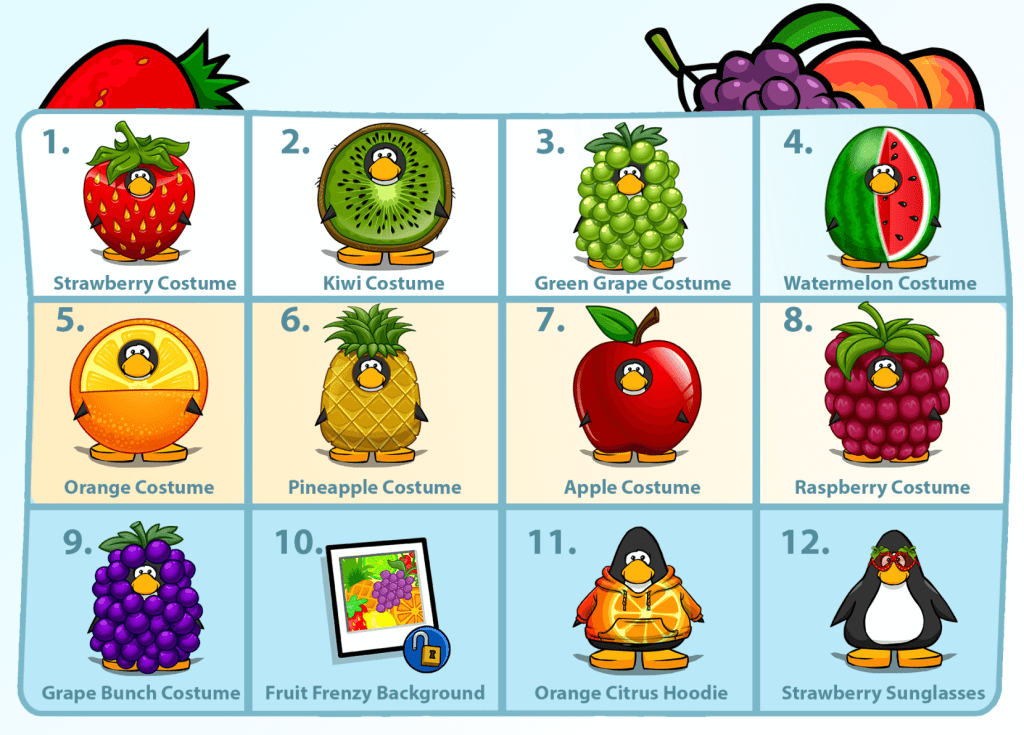
CP Rewritten: Strawberry Sunglasses Code
The final of the twelve fruit-themed items has been released, though it’s not too late to claim the items from over the last two weeks! Today’s item is the Strawberry Sunglasses, and the code is WXxGnWjdD.
Here is how to redeem the code:
- Go to the start page of the game, before logging in
- Click “Unlock Items Online” in the top right corner
- Click “I have a code”
- Enter the code which you read here into the box
- Click “Done” and you will have your items!
Thank you very much for reading, be sure to check back for more of the latest Club Penguin Rewritten news and guides!
Waddle on!
-Torres 126 -
CP Rewritten: Orange Citrus Hoodie Code
As part of the daily fruit codes, a new code is being released on Club Penguin Rewritten each day which will unlock a fruit-themed item. For today, you can unlock the Orange Citrus Hoodie by redeeming the code is iepCkKrT2.
Here is how to redeem the code:
- Go to the start page of the game, before logging in
- Click “Unlock Items Online” in the top right corner
- Click “I have a code”
- Enter the code which you read here into the box
- Click “Done” and you will have your items!

Thank you very much for reading, be sure to check back for more of the latest Club Penguin Rewritten news and guides!
Waddle on!
-Torres 126 -
Penguins and Puffles Around the World!
For over a year, Mountains Monday has included a photo taken in-real-life related to Club Penguin each month. It’s featured a huge range, from ski resorts to pianos, and demonstrated just how large the franchise was! Unfortunately though, it’s becoming really difficult to find new and exciting images, mostly because I’ve already shared them all. I still really like the concept of these photos though, so I’m planning to try something new!
When Club Penguin was still around, there was a section on the official blog called “Penguins Around the World” from which players could submit different photos which they’d taken featuring either a penguin or puffle. You can see an example below!
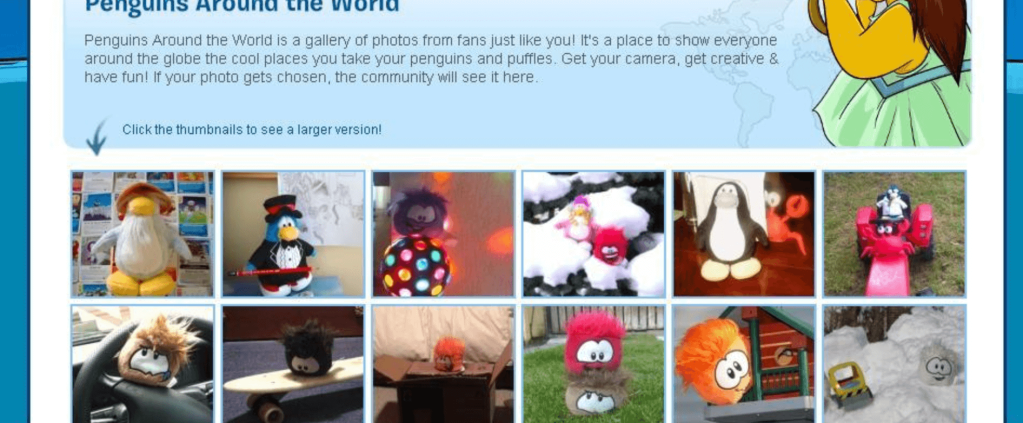
I’m really keen to introduce something similar to this as part of Mountains Monday! Although the plan is mainly dependent on how many people choose to get involved, each month, I’d hope to feature your photos of something Club Penguin related here on this blog! It could be anything, big or small. For example, here’s a photo of my puffle which I took a couple of years ago at Table Mountain in South Africa.

All you’d need to do is:
- Take a photo of your penguin or puffle in front of a nice background – it doesn’t need to be anything too special, even a tree outdoors would be super cool! It must be your own photo.
- Email the photo to photo@clubpenguinmountains.com or DM it on Twitter to @CPMountains – please include your penguin name if you would like it to be featured in the blog post!
I recognise that this will be a lot easier with Club Penguin merchandise, which not everyone might have access too, but even if you’ve drawn or created something, feel free to submit that too! The only rules are that it must be a photo (not a screenshot, I’m afraid!) and your own.
I’m not sure if all photos will be featured since that depends on how many people submit one, and I’m not even certain about what to expect because this is my first time trying something like this. However, I hope people will be interested and that it’ll be a lot of fun to participate in and read!
Waddle on!
-Torres 126
-
CP Rewritten: Fruit Frenzy Background Code
As part of the daily fruit codes, a new code is being released on Club Penguin Rewritten each day which will unlock a fruit-themed item. For today, you can unlock the Fruit Frenzy Background by redeeming the code is 5zqwJu1sO.
Here is how to redeem the code:
- Go to the start page of the game, before logging in
- Click “Unlock Items Online” in the top right corner
- Click “I have a code”
- Enter the code which you read here into the box
- Click “Done” and you will have your items!

Thank you very much for reading, be sure to check back for more of the latest Club Penguin Rewritten news and guides!
Waddle on!
-Torres 126